Anime Camera Movement Explained: How It Works And Common Types
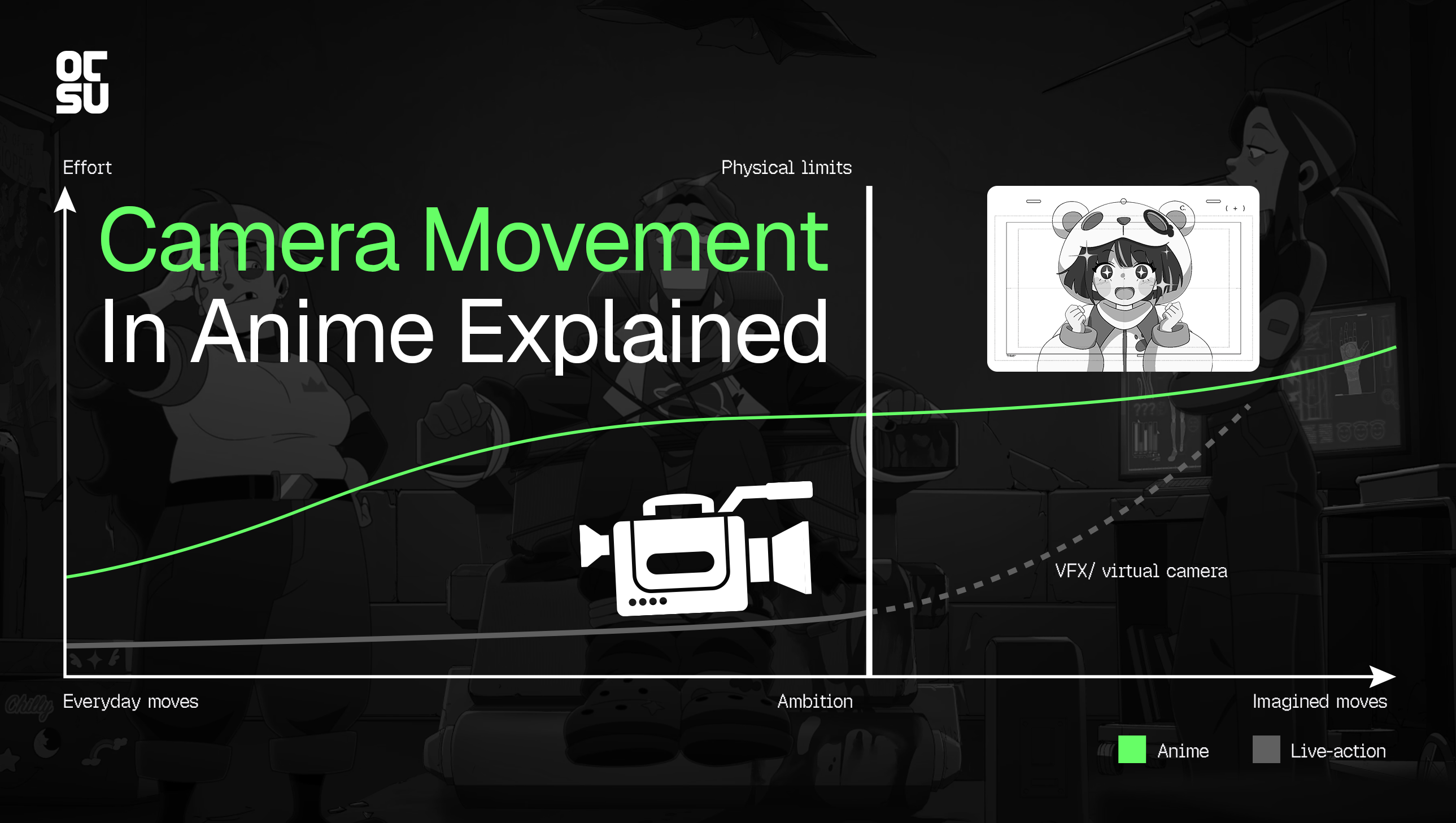
Anime camera movement can turn a still illustration into a sweeping cityscape or take viewers through spaces a real camera could never reach. But how do animators create these effects, and why do some movements require much more work than others? Explore how anime cameras work and the techniques behind everything from simple pans to elaborate virtual-camera shots.
Anime's Virtual Camera: What Freedom Really Costs
Camera movement is one of the tools that makes anime feel cinematic. A slow zoom can build tension, a sweeping pan can reveal an entire city and a camera orbit can transform a static composition into a dramatic action shot. These techniques shape what viewers see, where they look and how they experience a scene.
Yet camera movement in anime works differently from its live-action counterpart. Although anime can depict almost anything, creating a convincing view from a new angle may require additional artwork, compositing or 3D assets. That production effort helps explain why anime often relies on simple pans and zooms while reserving more elaborate camera movements for moments that benefit from them.
To understand the difference, let's look at how anime creates camera movement, what makes certain techniques more demanding and the types of camera movement used in anime, from everyday moves to physically impossible camera paths.
How Far Can A Camera Go In Anime?
Live-Action Cameras vs. Anime's Virtual Cameras
In live-action, camera movement is constrained by physical reality. A camera can only travel where the equipment, environment and filming setup allow it to. Anime has a different set of possibilities: its virtual camera can move through impossible spaces, fly around characters from any angle or pull back into a perspective that no physical camera could capture. But creative freedom doesn't mean every shot is equally easy to produce.
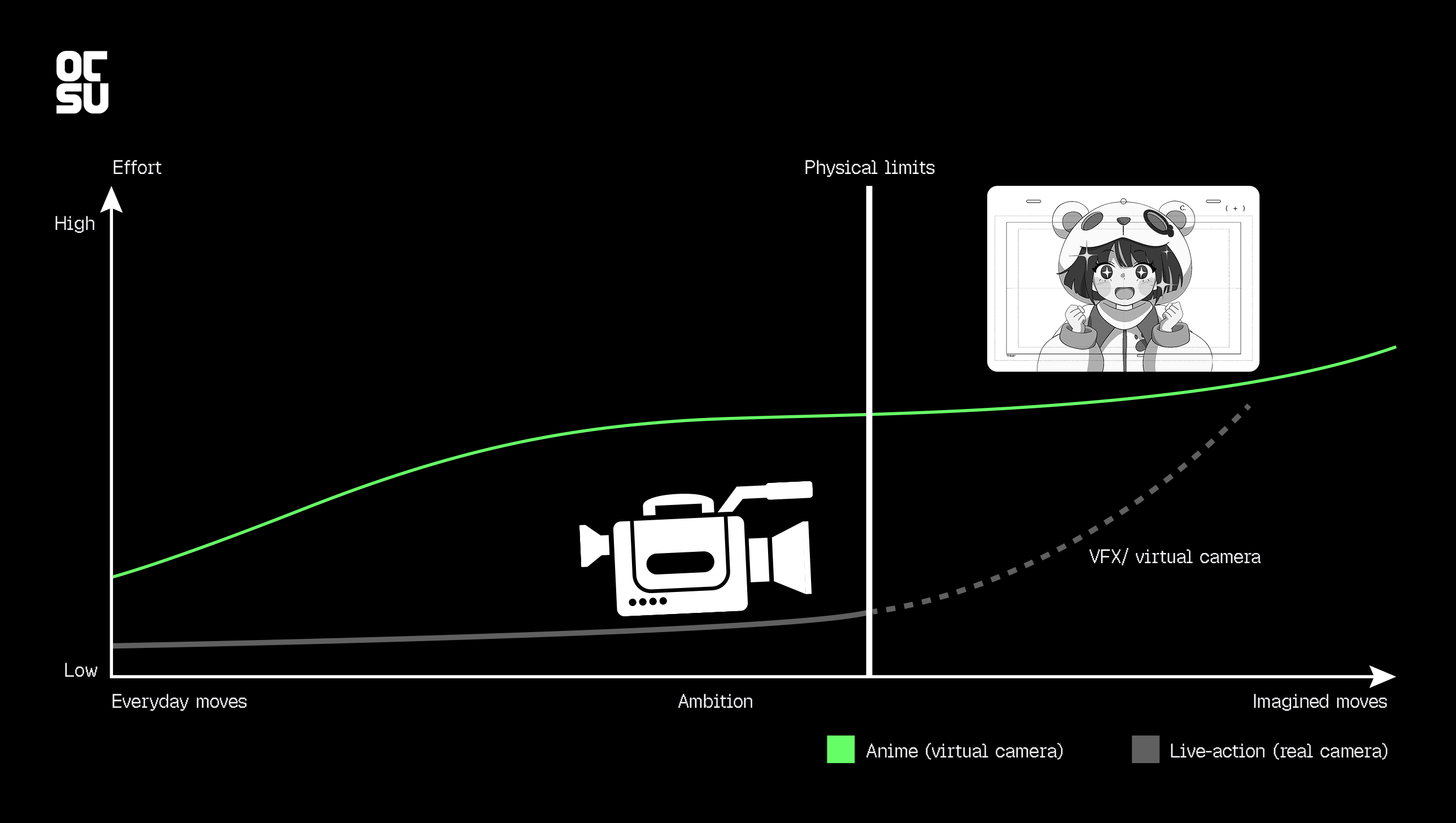
The following chart compares camera movement in anime and live-action across two dimensions: ambition and production effort. Moving from everyday techniques, such as pans and zooms, toward more imaginative camera paths generally requires more work. In live-action, increasingly ambitious movements can run into physical limitations. In anime, those limitations can be bypassed, but the production still has to create everything the shot reveals.
A simple pan across a background may require relatively little additional work. A complex virtual-camera move that circles a character, reveals new angles or travels through a layered environment may require additional drawings, background artwork, compositing or 3D assets. The more the camera reveals, the more visual information the production may need to create.
That's why the green curve continues beyond the real camera's physical limits. The dotted line represents VFX and virtual-camera techniques that allow live-action to push beyond the physical limits of a real camera. Anime's virtual camera can achieve similarly ambitious movements, but these still come with production costs.
This is also why camera movement is planned as part of anime's production process. During layout, the team establishes elements such as camera position, height, angle, lens and movement, alongside the composition and placement of characters and backgrounds. These decisions guide the subsequent animation and background work.
Why Simple Camera Moves Are Often More Practical
Consider a pan across a city street. If the entire street has already been drawn as a sufficiently wide background, the camera can move across it without requiring the artist to redraw the scene for every frame. A zoom can similarly bring the viewer closer to a character by changing the framing over existing artwork.
These moves can create a sense of motion while keeping the amount of additional work relatively low. Their efficiency depends on what artwork is already available and what the movement reveals, but they are often practical choices for anime production.
The same logic connects to limited animation. Limited animation is not simply about animating fewer frames; it also involves deciding where movement is most valuable and how to achieve a desired effect efficiently. This doesn't mean anime cannot use more elaborate camera techniques. It means every creative choice has production implications. If a simple move communicates the scene effectively, adding a complex camera path may not be worth the extra work.
Want to understand this approach better? Read our article on limited animation for a closer look at how anime makes the most of movement.
Why Changing Perspective Takes More Work
Moving the camera through space is a different challenge from moving the frame across a picture.
Imagine a camera pushing toward a character in a room. In live-action, the changing perspective comes naturally from the camera's movement. In a flat illustration, simply enlarging the image won't reproduce all the same spatial changes.
A convincing dolly shot may require artists to redraw parts of the environment or prepare artwork from different angles. An orbit around a character can be even more demanding if the character and surroundings need to remain consistent as the viewpoint changes.
The work varies by shot. Some movements can suggest depth using separate layers, while others need a more complete 3D environment. Either way, the production must account for the visual information revealed by the camera.
How 3DCG Makes More Camera Moves Possible
3DCG can make complex camera movement more manageable because a modeled environment can be viewed from multiple angles. Once the necessary geometry exists, the virtual camera can travel around a character, move down a corridor or circle a structure without requiring every view to be drawn from scratch.
That doesn't mean 3DCG automatically makes a shot cheap. Modeling the environment still takes work, and the team may need to adjust lighting, textures and rendering to fit the anime's visual style.
The benefit depends on the production. A 3D environment that's already available can support camera movements that would otherwise require substantial new artwork. A scene that needs to be modeled from the ground up has a different cost.
Live-action filmmakers face a related challenge when they want a camera to travel somewhere physically inaccessible. They can use visual effects to extend or reconstruct the environment and continue the shot with a virtual camera.
Speaking of 3DCG, camera movement is one area where CGI can shine, opening up possibilities that are difficult to achieve with hand-drawn animation. Explore the pros and cons of anime CGI in this Otsu Animation video.
The key takeaway is: Anime's virtual camera isn't restricted by physical space. The challenge is creating the artwork or environment needed to support its movement. That's why a simple pan can be an efficient choice, while a shot that reveals entirely new perspectives may require substantially more work.
Anime Camera Movements From Easy to Hard
The following techniques progress from relatively straightforward moves to those that often demand more elaborate scene preparation. This isn't a universal ranking: an existing 3DCG environment can make a complex move easier, while even a simple pan can require extra artwork if the background isn't ready for it.
Pan And Tilt: Moving Across The Artwork
In live-action cinematography, a pan rotates the camera horizontally from a fixed position, while a tilt rotates it vertically. In anime, pan is used more flexibly: it can refer to moving the view across a larger illustration, including vertically through a tall background. The artwork moves relative to the frame, creating a similar screen movement without requiring a physical camera to rotate.
These moves work well when the necessary artwork already exists. If the frame needs to reveal areas beyond the original illustration, artists may need to extend the background or prepare additional artwork.
Zoom In And Zoom Out: Changing The Framing
A zoom in makes the subject appear closer, while a zoom out reveals more of the surrounding scene. In live-action, a zoom changes the lens's focal length. In 2D anime, the effect can be created by scaling the artwork or changing the camera's framing.
Zooms are useful for emphasizing a character's reaction or drawing attention to a small detail. They're often economical when the source artwork supports the required framing.
There are limits, though. Enlarging a small image can expose a lack of detail, while zooming out may reveal that the original artwork doesn't extend far enough beyond the frame.
Follow Pans And Scrolling Backgrounds: Keeping Up With The Action
A following camera move keeps a character or moving object in view as the action progresses. One common approach in anime is to scroll the background while the character moves within the frame.
In The Girl Who Leapt Through Time (2006), the camera follows Makoto as she runs, keeping her in frame while moving alongside her. This is often called a follow pan in anime, though the movement can also be described as a dolly shot when the camera itself travels through space rather than simply rotating to track the subject. The effect makes us feel as if we’re running alongside Makoto, experiencing her changing pace firsthand.
This approach works particularly well when the character follows a predictable path. More complex movement may require additional background artwork or more carefully coordinated layers.
Layered Parallax And Multiplane Movement: Creating Depth
The parallax effect creates an impression of depth by making objects at different distances move at different rates. During a lateral camera move, nearby objects generally shift more across the frame than distant ones.
Anime can achieve this effect by separating a scene into foreground, middle-ground and background layers, then moving those layers at different speeds during compositing. A tree close to the viewer might move quickly across the frame, while distant buildings shift more slowly. The difference in movement helps the scene feel deeper than a single flat image. This technique is often called a “book” in some Japanese animation workflows, although terminology varies between studios.
Otsu Animation used 6 background layers for the Colorful Array MV featuring Neuro-sama. The layers were moved at different rates to create depth without animating the entire environment. You can read more about the technique in Otsu's background production guide.
Multiplane animation is a traditional technique for creating parallax, famously developed further by Walt Disney Studios. It places separate layers of artwork at different distances from the camera, so they shift at different rates as the camera moves, giving a flat scene a sense of depth. Modern animation can achieve a similar effect digitally, without a physical multiplane setup.
Parallax creates depth by moving flat layers of artwork at different speeds. This works well for camera movements that keep the scene within the angles the artwork can show. If a shot needs to move around an object and reveal its other side, however, the original drawing may not be enough. Artists would need to create additional artwork or use 3D assets, adding more work to the production.
Want to see these techniques in action? Watch our video on how anime use perspective and parallax to create depth.
Dolly In And Dolly Out: Moving Through Space Instead Of Zooming
A dolly in moves the camera toward a subject, while a dolly out moves it away. Because the camera changes position, a dolly can alter the apparent relationship between foreground and background objects.
In a hand-drawn scene, reproducing these perspective changes can require the environment to be redrawn or adapted. A layered composition can suggest some depth, while a 3D environment can provide a more complete representation of the space.
The work depends on the shot. A subtle push toward a character may be achieved with prepared artwork, while a move that travels through a detailed environment can demand more extensive scene construction.
Tracking And Trucking Shots: Moving Alongside A Scene
In live-action filmmaking, a tracking shot moves the camera from one position to another using a dolly, track or other moving rig. A trucking shot specifically moves the camera sideways. Imagine filming a street from a moving vehicle: buildings and objects pass through the frame as the camera travels along the street.
In anime, this movement can be simulated by moving a virtual camera through a 3D environment or by coordinating background layers to create the impression of travelling through space. The more the shot changes perspective or reveals parts of the scene that weren’t visible before, the more artwork or 3D assets it may require.
Crane And Vertical Camera Moves: Revealing Space From Above Or Below
A crane shot gets its name from the mechanical crane used to lift and lower a camera during live-action filming. The camera moves up or down through space, changing its height and potentially revealing the scene from a new viewpoint. For example, a shot might rise from street level to look down over a crowd.
In anime, creating this effect may require more than scrolling across a background. As the camera rises, the scene may need to show rooftops or the tops of objects that weren't visible from the original angle. Artists must prepare artwork for these new views or use 3D assets to create the changing perspective.
Orbit And Arc Shots: Circling Around A Subject
An orbit shot moves the camera around a subject, revealing it from changing angles. An arc shot follows a curved path around the subject, often covering only part of a full orbit.
These movements can be demanding in hand-drawn anime because the character and environment must remain convincing as the viewpoint changes. The production may need new drawings or carefully constructed perspectives to show the subject from different sides.
In a 3DCG environment, the virtual camera can travel around existing geometry. That can simplify the camera movement itself, although modeling and integrating the assets still require work.
For example, this half-rotation shot creates the impression of a camera orbit using only 2D artwork. The hand-drawn character is combined with three background layers moving at different speeds, using parallax to create depth without a 3D environment or actual 3D camera movement.
So, a full rotation is especially challenging because the subject must remain convincing as the viewpoint changes all the way around it. But is it the hardest camera movement to animate in anime, and how do animators create the effect? Explore the challenge of rotation shots in anime by Otsu Animation.
Virtual Flythroughs And Impossible Camera Moves
Virtual cameras can travel through spaces that a physical camera couldn't access. A shot might pass through a keyhole, travel inside a small object or move through a wall before emerging into another room.
Anime can create these sequences using hand-drawn artwork, layered images or 3DCG. The camera path itself isn't restricted by physical dimensions, but the production still needs to create the visual information that makes the journey convincing.
In 2D animation, that may mean preparing multiple perspectives and drawing new parts of the environment as the camera travels. A 3D scene can provide more freedom to explore the space, provided the necessary geometry and details have been constructed.
Some of the more ambitious camera movements we’ve covered can be seen in this video by Otsu Animation. From the orbiting shot in Blue Lock to the 3D flythroughs in Attack on Titan and Land of the Lustrous, these examples demonstrate how anime can move beyond conventional framing to create more immersive, dynamic shots.
Bringing Camera Movement to Life in Anime Production
Camera movement is both a storytelling tool and a production decision. From a simple pan across a painted background to a complex virtual-camera sequence, the right approach depends on the scene's creative goals, the production method and the work required to achieve the intended effect.
At Otsu Animation, we create anime-style animation for projects ranging from commercials and social content to trailers and original IP. Whether your project calls for subtle camera movement to bring a scene to life or a more ambitious sequence that pushes visual boundaries, the right production approach starts with understanding what the shot needs to achieve.
Planning an animated project? Get in touch with Otsu Animation to discuss your ideas and explore the right approach for your production.
What are the most common camera movements in anime?
Common camera movements in anime include pans, zooms and follow moves. More elaborate techniques include tracking shots, crane shots and orbits around a subject.
Why are complex camera movements difficult to animate in 2D?
Complex camera movements are harder to animate in 2D because changing the viewpoint can reveal angles or parts of a character and environment that haven't been drawn yet, requiring additional artwork to maintain visual consistency.
How do anime studios create 3D camera movements?
Studios can use 3DCG environments, layered artwork and compositing to simulate depth and camera movement. The method depends on the shot.
How does the parallax effect create depth in anime?
The parallax effect creates an illusion of depth by moving foreground and background layers at different speeds as the camera view shifts.
How does parallax create camera movement in anime?
Parallax creates an illusion of depth by moving foreground and background layers at different speeds as the view shifts.
Why is 3DCG used for camera movement in anime?
3DCG lets a virtual camera move around modeled environments and view objects from different angles without drawing each perspective separately.